iPhone App

Print more.
Waste less
paper.

PhotoPacker arranges multiple photos onto a single page, automatically — so every print run uses exactly as much paper as it needs to.

Download on the App Store Free · Pro $1.99
Auto-arranged layout
Minimum paper waste
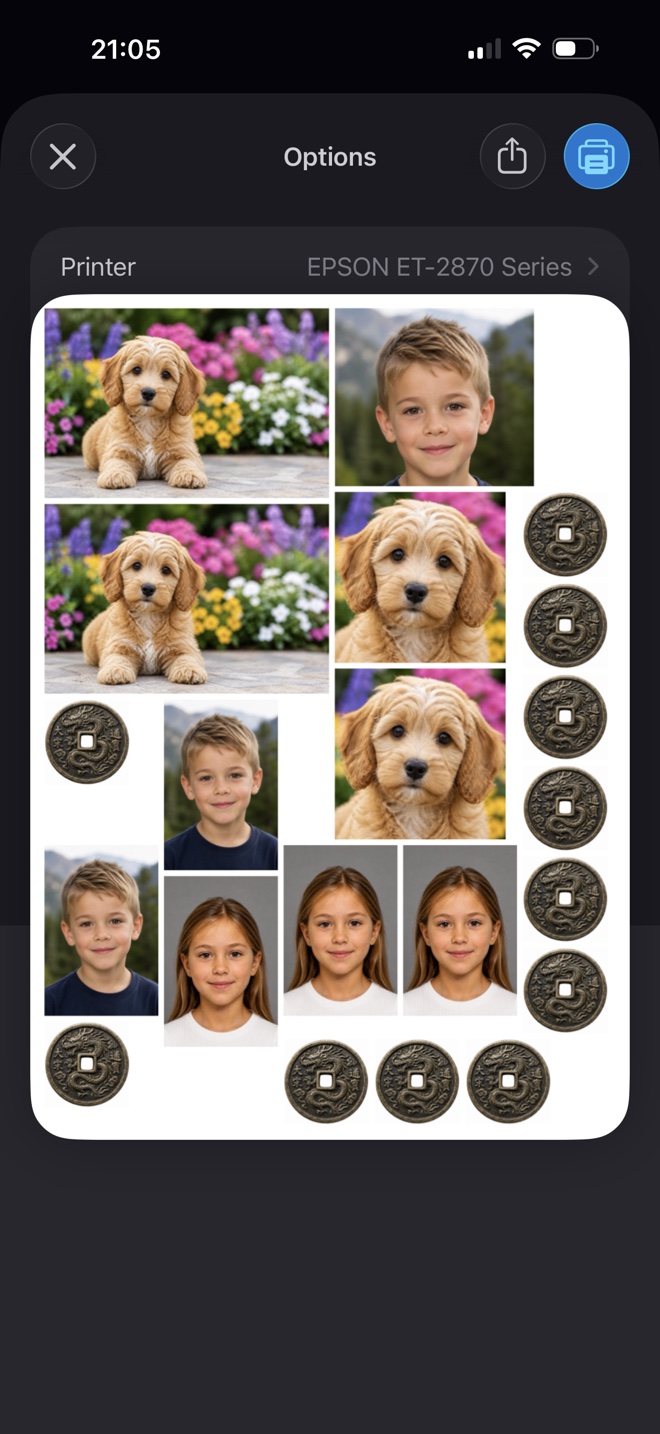
PhotoPacker packed layout

Three steps to perfect prints

1
Select Photos

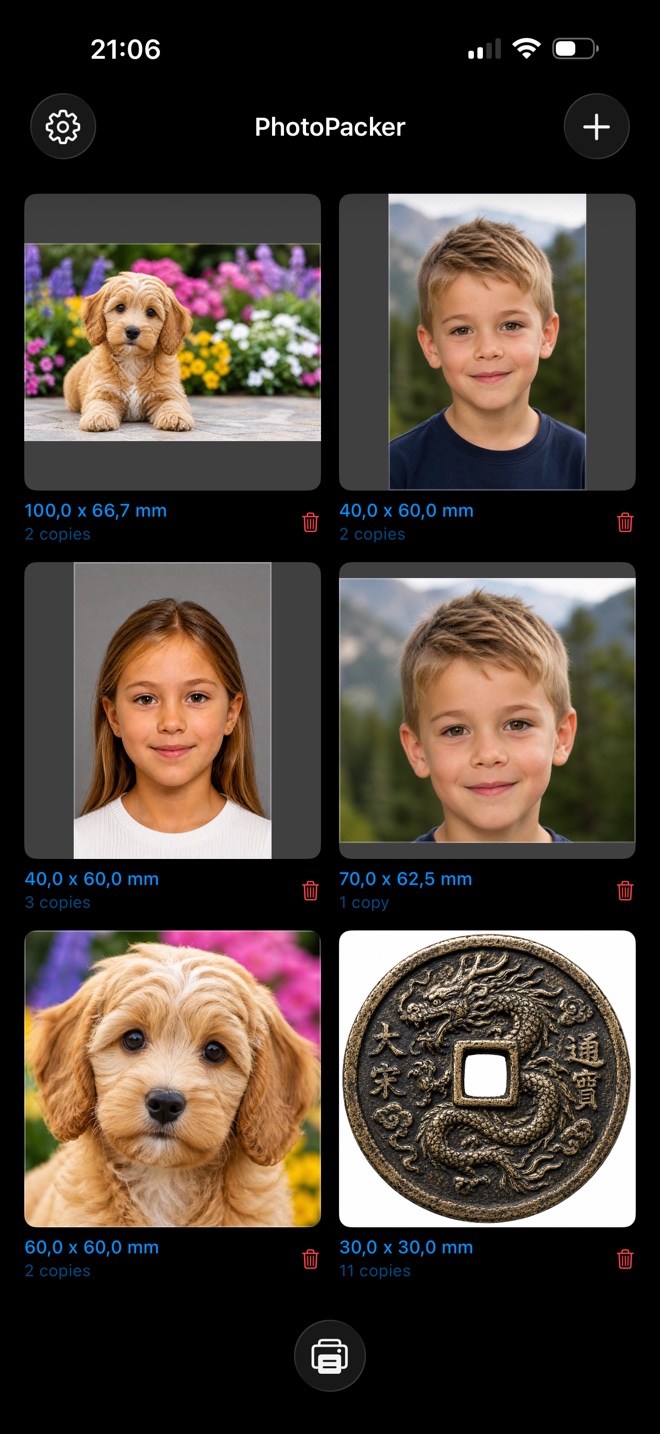
Pick any number of images from your library. Each photo can have its own size and copy count.

2
Set Sizes & Copies

Choose from preset sizes — passport, wallet, standard — or dial in a custom dimension in mm, cm, or inches.

3
Print

PhotoPacker automatically tiles everything across as few pages as possible. Hit print and you're done.

Everything you need,
nothing you don't

PhotoPacker is focused and precise. No subscription, no cloud uploads, no account required. Your photos stay on your device.

⚡
Smart Page Packing

An optimized layout algorithm arranges all your photos to fill each page efficiently, minimizing paper use.

📐
Precise Sizing

Set exact dimensions per photo in mm, cm, or inches. Switch units at any time without losing your values.

📋
Copy Counts

Need 4 passport photos and 2 wallet prints? Set individual copy counts per image — all packed together.

🔍
Photo Adjustment

Pinch to zoom and drag to reposition within the crop frame before printing — no external editor needed.

📄
Multi-Page Output

When photos exceed a single page, PhotoPacker automatically distributes them across as many pages as needed.

🖨
AirPrint Ready

Works with any AirPrint-compatible printer. A4 and Letter paper sizes supported out of the box.

✂️
Crop Tool

Trim any photo with draggable handles. The print size follows your crop automatically — no guesswork.

🔳
Automatic Size

Fill your pages with the largest possible prints — every photo sharing one size, across a page limit you set.

🖼
Layout Area

Pack photos into a custom-sized block like 10×15 cm, centred on the page with crop marks for clean cutting.

Every size,
ready to go

Choose from built-in presets — or enter any custom dimension. Passport sizes for official documents, metric sizes for standard prints, imperial for North American standards.

Passport 35×45mm Passport 30×45mm 40×60mm 60×90mm 9×13 cm 10×15 cm 13×18 cm 4×6" 5×7" 2×3.5" 1.5×2.5" 1:1 square 3:2 landscape 16:9 wide Custom size
PhotoPacker photo list

Print passport photos
at home

Take one photo, pick the size, and PhotoPacker fills a whole page with exact copies — ready to print on any AirPrint printer and cut out. No account, no uploads, and your photos never leave your iPhone.

  1. Choose a passport preset. 35×45 mm or 30×45 mm, sized exactly — no scaling guesswork.
  2. Add your photo and set the copies. PhotoPacker packs as many as fit on the page.
  3. Print and cut. Send it to your printer with AirPrint and trim along the edges.
Preset sizes
35×45 mm 30×45 mm

Requirements differ per country and document. PhotoPacker takes care of size and layout — check your country's rules for background, pose and head size.

Save the trip

A photo shop typically charges $12–18 for a set of passport photos. At home it costs a sheet of photo paper.

Try it free

A full sheet of passport photos is one photo, many copies. Your first print job runs without the free-version limits; Pro is $1.99, one time, for unlimited copies from then on.

Unlock the full
PhotoPacker

A single, one-time purchase. No subscription, no renewal, no catch. Pro unlocks unlimited photos, unlimited copies, and fine-grained layout controls.

Feature Free Pro
One free print, no limits ✓ Always
Photos per session Max 3 Unlimited
Total copies Max 4 Unlimited
Custom margins ✕ ✓
Custom photo gaps ✕ ✓
Auto-rotate for fit ✕ ✓
Automatic size ✕ ✓
Custom layout area ✕ ✓
Photo borders ✕ ✓
All preset sizes ✓ ✓
Custom sizes ✓ ✓
PhotoPacker Pro
$1.99
One-time purchase · No subscription
  • Unlimited photos in one session
  • Unlimited copies per photo
  • Custom page margins (0–20mm)
  • Custom spacing between photos (0–10mm)
  • Auto 90° rotation for optimal layout
  • Automatic size — biggest prints across your pages
  • Custom layout area with crop marks
  • Photo borders in any colour and width
Get Pro — $1.99